

Merge in three steps
- 1
Open Merge PDFs and add your documents. Read the numbered cards: these show the file sequence.
- 2
Drag whole file cards into the desired order. Use A–Z sorting only when alphabetical filename order is the order you actually want.
- 3
Open Edit pages on a file to move, rotate or remove its pages. Check the retained counts, then press Merge PDFs and inspect the download.
File order and page order are two separate decisions
Moving a whole file card changes where that document appears in the pack. Moving a page inside Edit pages changes that file’s internal sequence. For a report and appendix, put the report card first; do not move individual report pages to imitate a file reorder.
The numbered cards are a useful final check. Read them in order before processing, then look at the first page preview of each file. Long or similar filenames can be misleading, so inspect the actual content as well.
Use filename sorting deliberately
The sorting button offers ascending and descending filename order. Alphabetical order is useful for carefully named batches, but it does not understand chronology, document importance or printed page numbers. Check the visible sequence after every sort.
For example, a CV may need to come before a certificate even when its filename sorts later. Manual ordering is safer when the recipient gives a document checklist. Consistent filenames such as 01-cover, 02-report and 03-appendix can make a batch easier to identify, but still verify the card numbers.
Fix a source without rebuilding the entire pack
Use Edit pages on the relevant card to inspect its page thumbnails and available move, rotate and remove controls. Rotation changes the direction a page faces; movement changes its position. Check that the selected control addresses the problem you actually see.
Removing a page changes the expected total. Write down or compare the retained counts after editing. If you removed a required page accidentally, restore the source from your original rather than accepting an incomplete pack. Keep at least one useful page in every file you retain.
Check the boundary pages
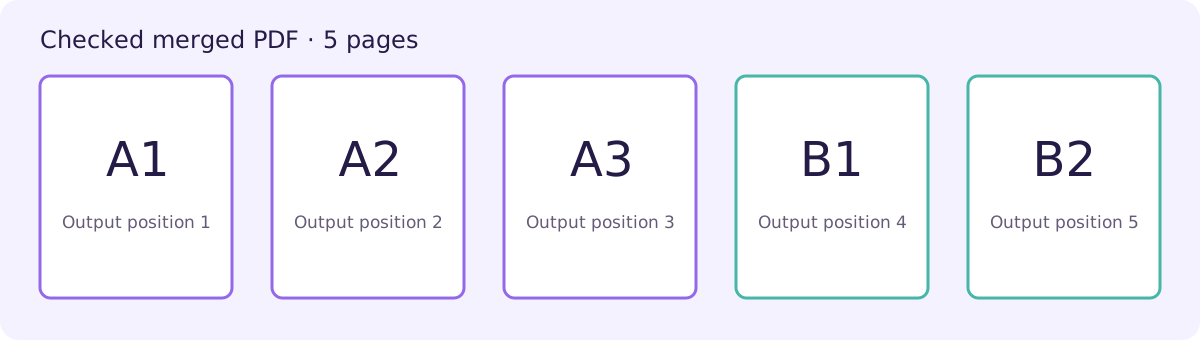
A file can look correct on its cover while containing a duplicate or misplaced page later. After merging, inspect the final page of each source and the first page of the next. A1, A2, A3 followed by B1, B2 should have its boundary between positions three and four.
Printed page labels may restart in each document. Use actual PDF positions for counting. For a submission pack, also check names, dates and version identifiers so the right order does not conceal the wrong source version.
A five-page worked example
Engine check: 8 October 2026 · Current repository assembly function · Node.js and pdf-lib
PDF A contains A1, A2, A3. PDF B contains B1, B2. We checked the current page-assembly function with these inputs and inspected all five output labels: A1 → A2 → A3 → B1 → B2. This is an engine check, not a fresh live-site or physical-phone test.
Buddy keeps each stack together
Finish PDF A, then continue with PDF B.
Alternating pages is a separate task.
Try arranging two files
Put PDF A before PDF B. This practice uses labels only; it does not process or upload files.
- 1. PDF BB1, B2
- 2. PDF AA1, A2, A3
Check your result
Confirm both levels of order: numbered file cards before processing, then internal page order and source boundaries in the downloaded PDF.
Sorting uses filenames, not document meaning. The tool cannot infer your required submission order or detect that a source is the wrong version.
Practical tips
- Check card numbers after sorting or dragging.
- Use Edit pages for a problem inside one source, not for changing whole-file order.
- Compare retained counts after removing pages.
- Open the final download in the reader you normally use.
Questions
Does A–Z sorting sort pages?
It sorts files by name. Use Edit pages to change the sequence within a file.
Why do printed page numbers restart?
Each source can have its own printed numbering. The merged PDF still has one continuous set of document positions.
Can I rotate only one page?
The file’s Edit pages area provides individual-page rotation controls. Check that page after export.