

Create a reading copy without review comments
A reviewed draft contains notes, highlights, stamps and page links.
Open Remove annotations →Follow these steps
- Choose the supported source file or files from your device.
- Use the original single PDF before making other workspace changes.
- Export the cleaned copy and inspect comments, stamps, highlights and links.
The document and the intended outcome
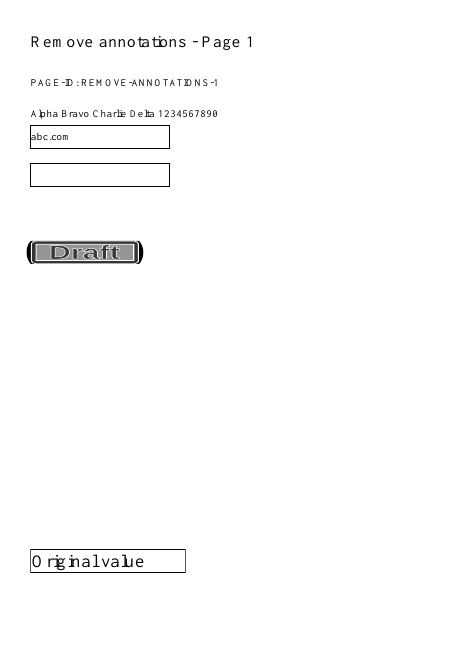
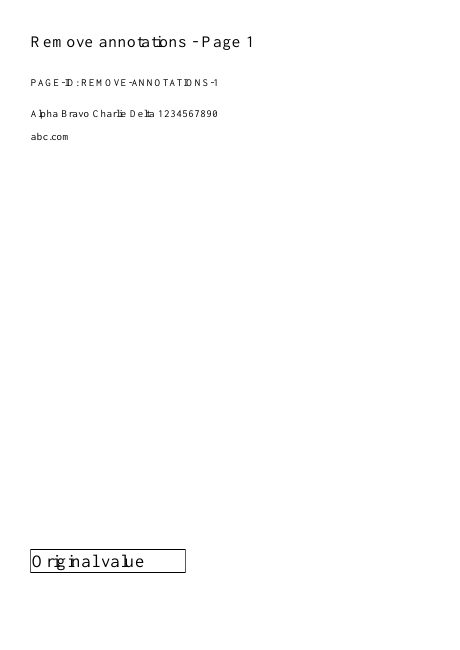
A reviewed draft contains notes, highlights, stamps and page links. Remove non-form annotations and check that visible document content and form widgets remain.
Make this example work for your file
For a reviewed draft, decide whether comments and highlights are part of the record you must retain. Save the reviewed original separately before making a clean reading copy.
Choose only the settings this case needs
Use the original single PDF before other workspace edits. Inspect the comments panel and several annotated pages after export; preserve the review original for reference.
When the example needs a different approach
Form widgets are intentionally kept. Fill or flatten them separately if you need a static reading copy.
A checked example you can try
Non-form annotations removed; Name field value retained.
Settings used in this engine check
- quality
- compact
- angle
- 90
- margin
- 20
- start
- 1
- columns
- 2
Check the result
Form widgets are preserved. Graphics already flattened into page content cannot be removed as annotations.
Keep the original. When this task produces a file, reopen the download in the application where you will use it and inspect the affected pages. An illustration explains the operation; it is not a recorded processing test.
Practical tips
- Use the original single PDF before other workspace edits. Inspect the comments panel and several annotated pages after export; preserve the review original for reference.
- It may already be part of page content. Do not assume the tool failed simply because coloured pixels remain; check whether a live annotation is still present.
- Form widgets are intentionally kept. Fill or flatten them separately if you need a static reading copy.
Questions
A highlight remains visible?
It may already be part of page content. Do not assume the tool failed simply because coloured pixels remain; check whether a live annotation is still present.
A fillable box remains?
Form widgets are intentionally kept. Fill or flatten them separately if you need a static reading copy.
What is this tool useful for?
Prepare a copy without non-form annotations.
What should I check in the result?
Form widgets are preserved. Graphics already flattened into page content cannot be removed as annotations.